Discount codes
Give customers a code to enter at checkout for money off. Set a percentage or a fixed amount, choose when it runs and how many times it can be used.
A discount code is a short word or phrase, like AUTUMN15, that a customer types in at checkout for money off their booking.
Use them for seasonal offers, a thank-you to regulars, a launch promotion, or a one-off gesture to a customer who had a bad day.
You set the discount, when the code runs, how many times it can be used and which of your fields it works on. Paddli applies it automatically and shows the saving on the customer’s confirmation.
Where to find them
Section titled “Where to find them”Go to Organisation in the top bar, then Discount codes in the side menu. On a phone the menu is a row of pills under the Organisation heading, so scroll it sideways if you cannot see Discount codes straight away.
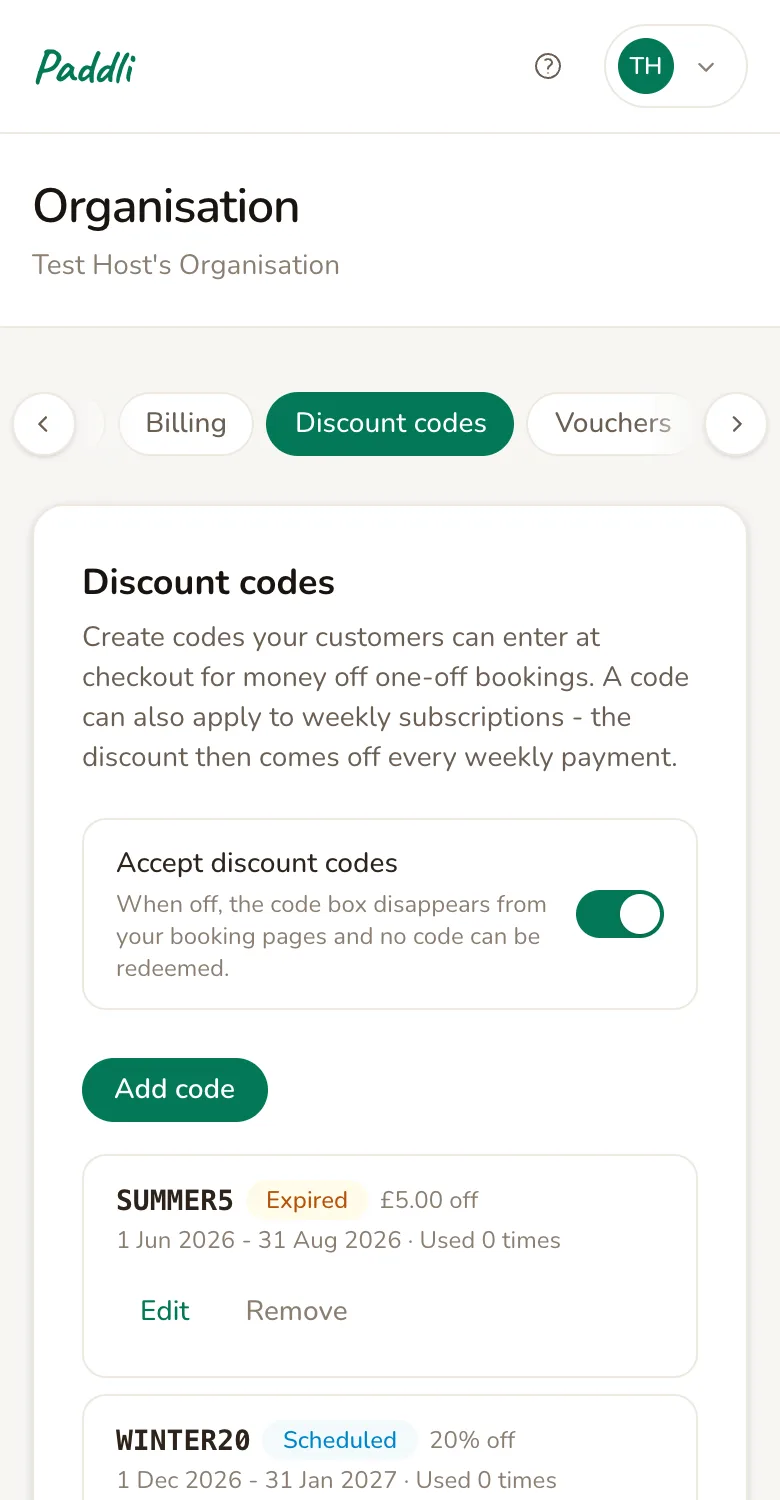
The Accept discount codes switch at the top is a master control. Leave it on. If you ever need to stop every code at once, switch it off: the code box disappears from your booking page and nothing can be redeemed until you switch it back on.
Create a code
Section titled “Create a code”Tap Add code and fill in the form.
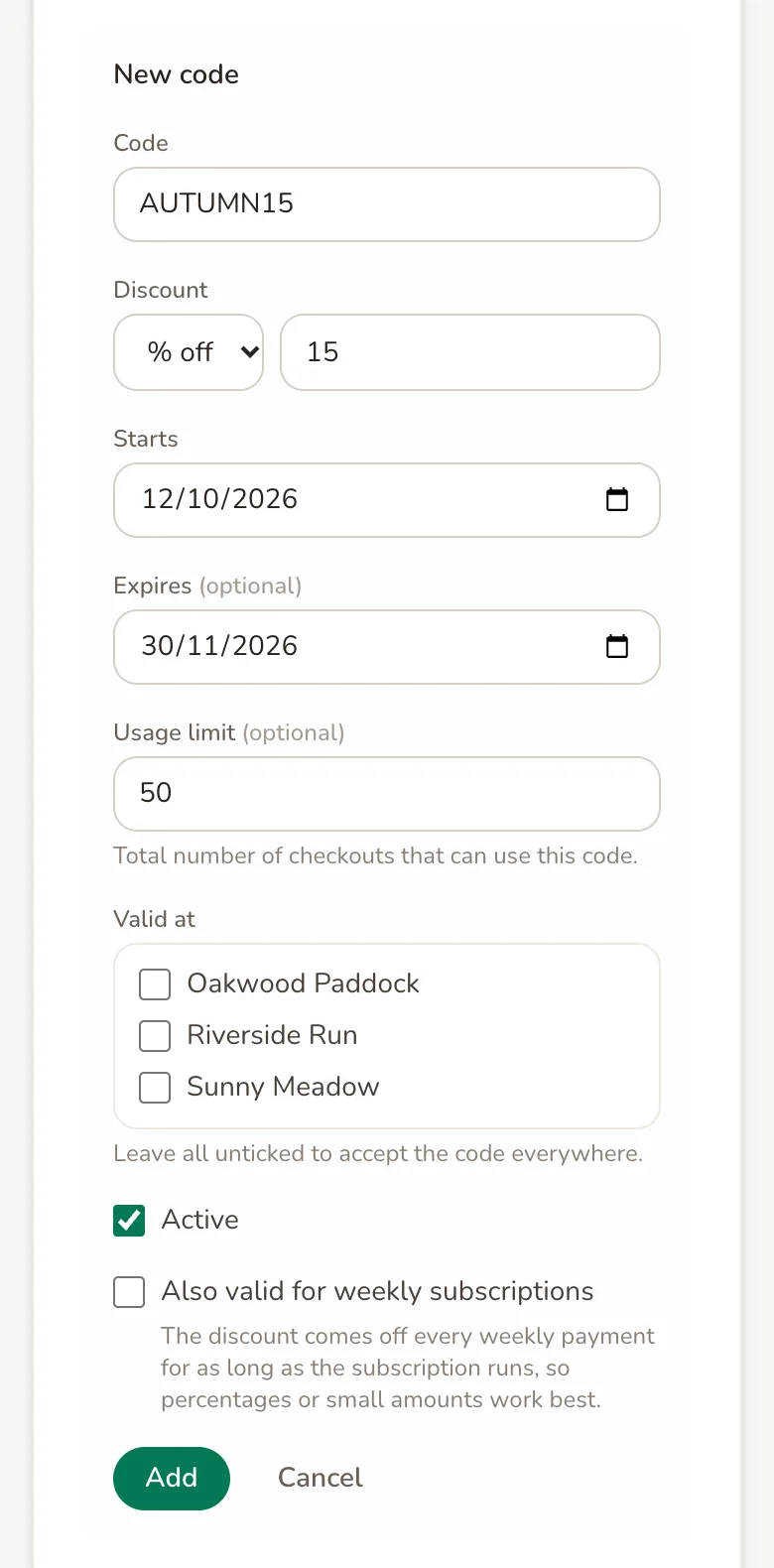
Code is what customers type.
Letters, numbers and dashes only, between 3 and 32 characters.
Paddli stores it in capitals, so autumn15 and AUTUMN15 are the same code and customers can type it either way.
Keep it short and easy to say out loud.
Discount is either a percentage off (a whole number from 1 to 100) or a fixed amount off in your currency. A fixed amount that is bigger than the booking makes the booking free rather than going negative.
Starts is the first day the code can be used. It defaults to today. Set a future date to prepare a promotion in advance: the code sits as Scheduled and cannot be redeemed until that day.
Expires is optional. After this date the code stops working and shows as Expired in your list. Leave it blank for a code that runs until you remove it.
Usage limit is optional and counts checkouts, not sessions. A customer who books three sessions in one go uses the code once. Set it to 1 for a code meant for a single customer.
Valid at only appears if you have more than one field. Tick the fields the code should work on, or leave them all unticked to accept it everywhere.
Active is ticked by default. Untick it to save a code without switching it on, or later to pause a code without deleting it.
Also valid for weekly subscriptions and repeat bookings on account lets customers use the code on a booking that recurs. The discount comes off every weekly payment or repeat session for as long as it runs, so use a percentage or a small amount rather than a big fixed sum. The option names only the recurring bookings you offer.
Tap Add and the code goes live straight away, as long as its start date is today or earlier.
What customers see
Section titled “What customers see”Once you have a usable code, a Have a discount code? link appears in the price summary on your booking page, just above the total. If you also sell gift vouchers it reads Have a discount or voucher code? instead. Customers who have not been given a code can ignore it.
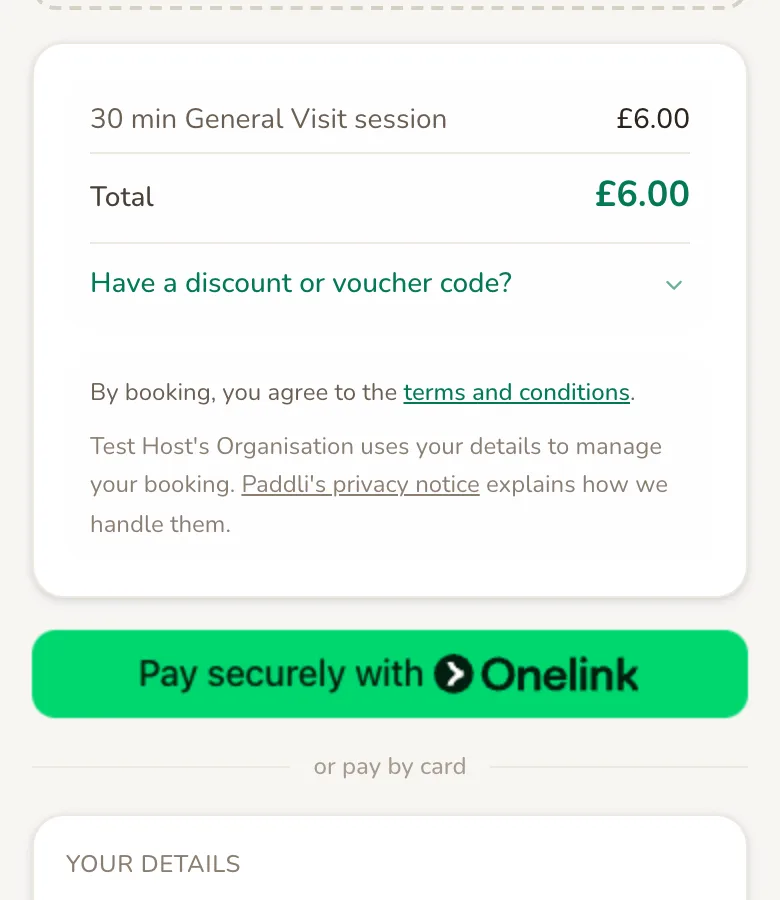
The customer taps it, types the code and presses Apply. The discount appears as its own line, the total updates, and the code is included on their confirmation page, in the confirmation email, and on your copy of the order.
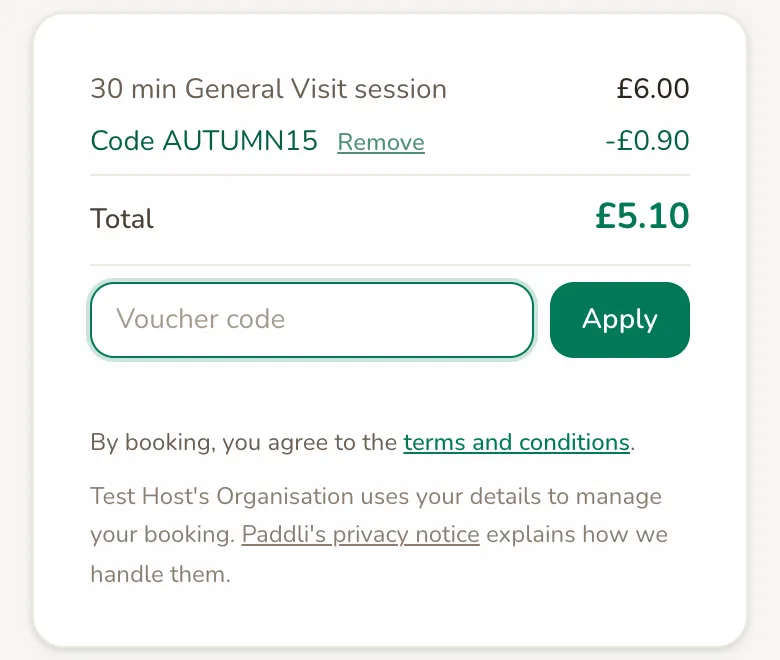
If a code is wrong, expired or used up, the customer sees a short message saying so and can try another. Codes that have not started yet are treated as invalid, so an upcoming promotion is not given away early.
Keep track of codes
Section titled “Keep track of codes”Every code in your list shows its status, its discount, the dates it runs and how many times it has been used.
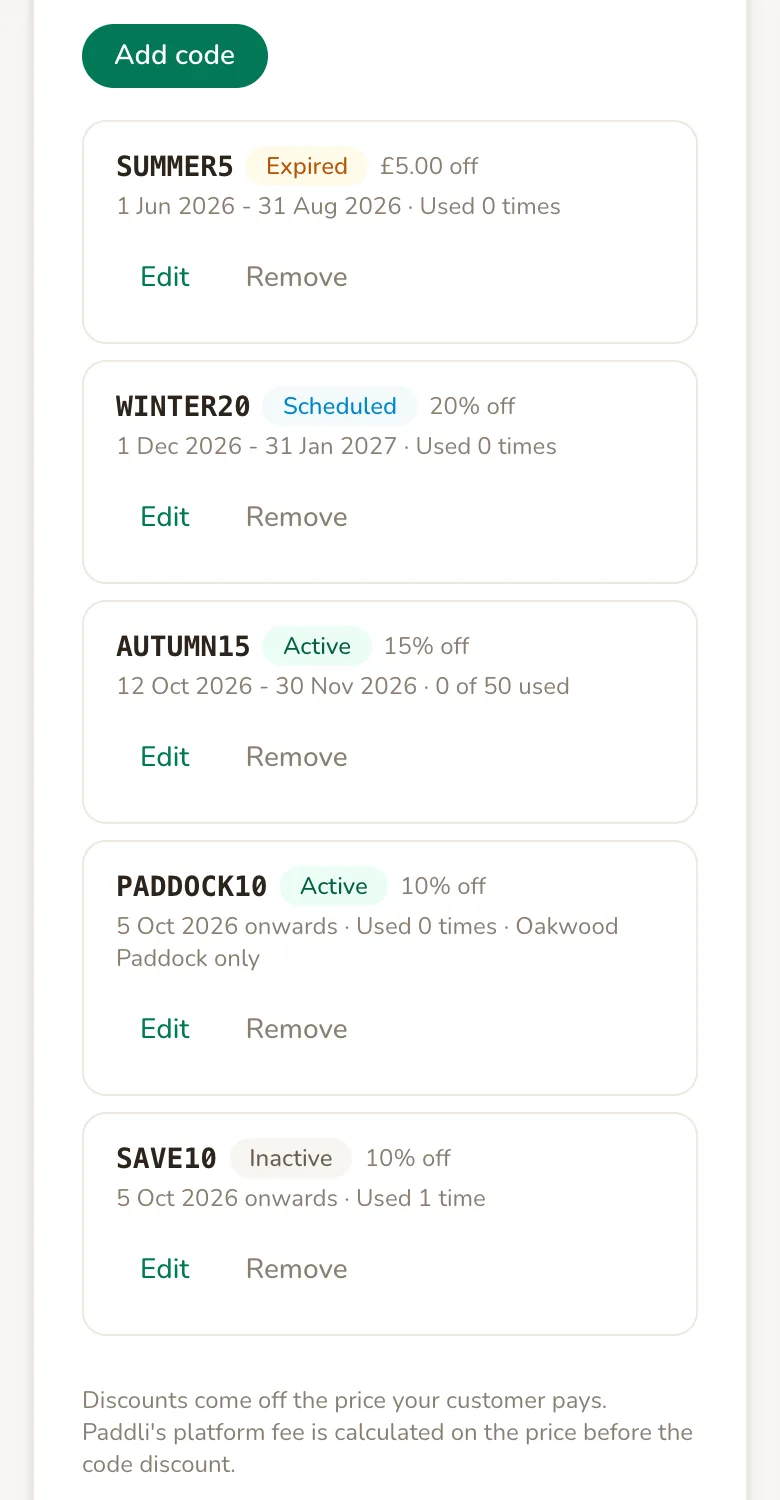
- Active is live and can be redeemed now.
- Scheduled has a start date in the future.
- Expired is past its expiry date.
- Inactive has been switched off with the Active tick box.
A code with a usage limit shows 3 of 50 used. Without a limit it shows Used 3 times. Each order’s discount is also shown on that order in your dashboard, under Bookings.
Change, pause or remove a code
Section titled “Change, pause or remove a code”Tap Edit on any code to change anything about it, including the code word itself. Changes apply to new checkouts; bookings already made keep the discount they were given.
To pause a code, edit it and untick Active. It stays in your list and you can switch it back on later.
To delete a code, tap Remove and confirm.
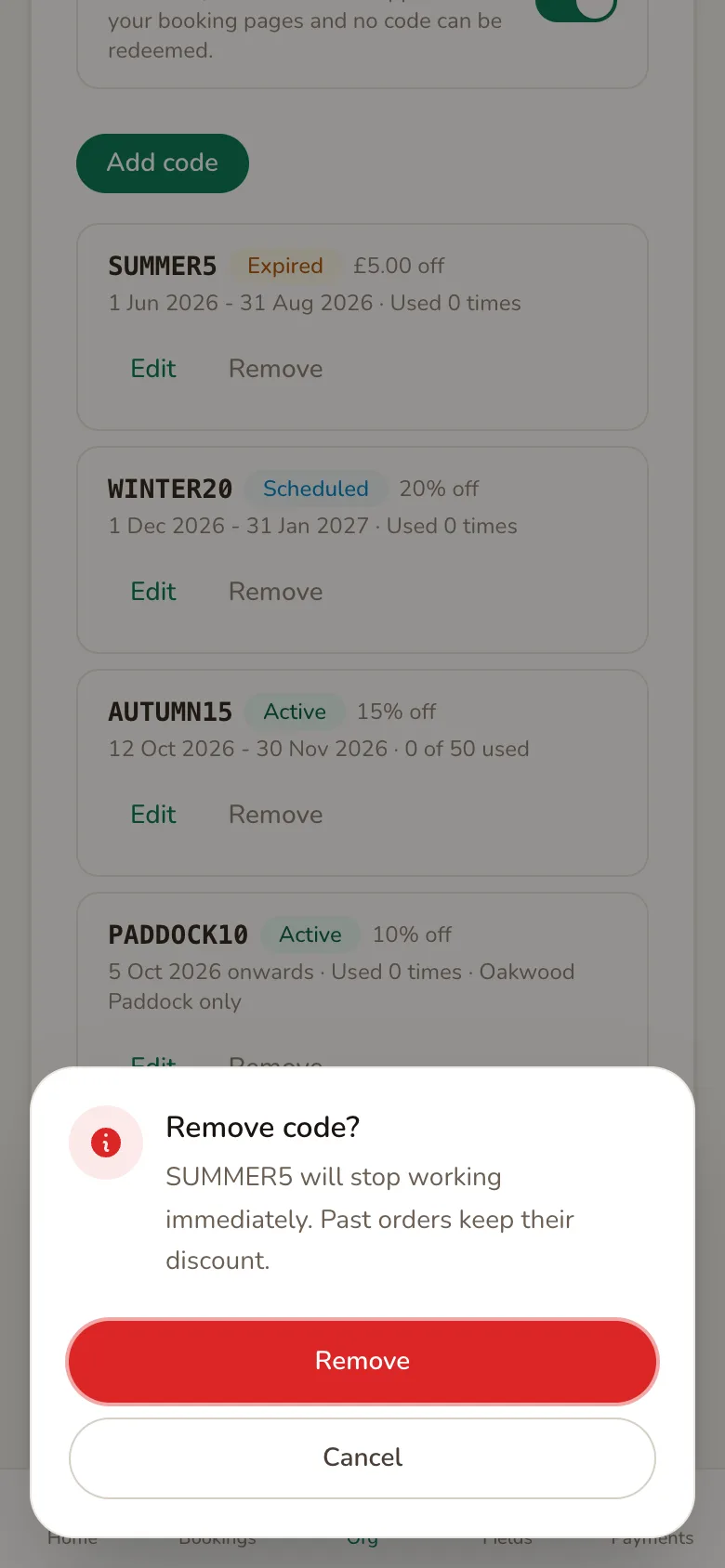
Removing a code does not touch past bookings: anyone who already used it keeps their discount, and you can reuse the same code word for a new code later.
Ideas for using codes
Section titled “Ideas for using codes”- Seasonal push.
JAN20for 20% off during the quiet weeks after Christmas, expiring 31 January. - Thank a regular. A fixed amount off with a usage limit of 1, sent to one customer by text.
- Launch a new field. Restrict a code to the new field only so your existing field keeps its normal price.
- Reward sharing. Give a code to a local dog trainer or walking group to pass on to their clients, and watch the usage count to see how much business it brings in.
- Fill a gap. Create a code with a short expiry to fill a run of empty slots this week, then let it lapse.
Related
Section titled “Related”Discount codes are one of three ways to take money off a booking, and they can be combined:
- Volume discounts apply automatically when a customer books several sessions in one checkout. They are taken off first, before any code.
- Gift vouchers are prepaid credit a customer buys in advance. A customer can use a voucher and a discount code on the same booking.
Frequently asked questions
Do I pay Paddli's fee on the full price or the discounted price?
The full price. A discount code is your marketing spend, so Paddli's 5% is worked out on the price before the code comes off. Stripe's processing fee is charged on what the customer actually pays, so a smaller payment means a smaller Stripe fee. Volume discounts are different, since they lower the base price before any fee is calculated.
Can a customer use two discount codes at once?
No. One discount code per checkout. A customer can combine a discount code with a gift voucher, though, and if they book several sessions in one go any volume discount you offer is applied first, with the code taken off what is left.
What happens if a customer cancels a discounted booking?
They are refunded what they actually paid for that session, after the discount. The redemption still counts towards the code's usage limit.
Can I give a code to just one customer?
Not by name, but you can get close. Create a code with a usage limit of 1 and send it to that customer. Once it is used, nobody else can redeem it.
Why can't my customers see the code box?
The code box only appears on your booking page when you have at least one code that is active, has started and has not expired or hit its limit. If Accept discount codes is switched off, or a code is restricted to a different field, the box stays hidden.
Can I make a booking completely free?
Yes. A 100% code, or a fixed amount larger than the booking, brings the total to zero and the customer books without paying. The booking appears in your dashboard like any other.
Does a code work for weekly subscriptions and repeat bookings?
Only if you tick the Also valid for option when you create it. The discount then comes off every weekly payment or repeat session for as long as it runs, so a percentage or a small amount works best. A code that would make the booking free is not accepted on either.
Can a customer use a code on an event?
Not yet. Discount codes work on session bookings and weekly subscriptions. Event bookings do not have a code box.